# 如何參與貢獻
> For AI agents: the complete glossary index is at [llms.txt](https://glossary.cncf.io/zh-tw/llms.txt).
> Markdown versions of every glossary page are available by appending `index.md` to the page URL.
## 歡迎
歡迎使用雲端原生 Glossary 的貢獻指南,感謝您的關注。
您可以透過以下方式參與貢獻,我們將在此進行詳細說明:
1) [在現有議題上進行工作](#work-on-an-existing-issue)
2) [提出新術語](#propose-new-terms)
3) [更新現有術語](#update-an-existing-term)
4) [幫助本地化 Glossary](#help-localize-the-glossary)
## CNCF Glossary 概述
該 Glossary 的目標是簡化複雜的雲端原生領域,使其更容易被人們理解和使用。
雲端原生 Glossary 的內容存儲在[此 GitHub 存儲庫](https://github.com/cncf/glossary)中,
您可以在那裡找到有關 Glossary 的[議題](https://github.com/cncf/glossary/issues)、拉取請求([PRs](https://github.com/cncf/glossary/pulls))和
[討論](https://github.com/cncf/glossary/discussions)。
## 誰可以貢獻?
您如何參與此專案取決於您的雲端原生專業知識水準。
簡化複雜的概念需要對該主題有深入的了解。
因此,要貢獻新術語,您必須精通該主題。
貢獻者通常是在這些技術上工作了一段時間的工程師或專注於雲端原生的學者。
專業知識是必需的,因為用簡單的話語解釋複雜的概念 _真的_ 很難。而且,儘管易於理解的結果可能看起來很簡單,但達到所需的簡單性需要雲端原生專家之間的努力和協作。
如果您尚未成為雲端原生專家但仍想貢獻,我們建議與專家合作。
一旦專家確信術語準確描述概念,您就可以做出第一個 Glossary 貢獻。
本地化工作是精通另一種語言的初學者可以為 Glossary 做出寶貴貢獻的地方。
借助現有的可靠英語定義,經驗不足的貢獻者可以將術語本地化為目標語言。您可以加入現有的本地化團隊或創建新的本地化團隊。
請閱讀本指南中[幫助本地化 Glossary](#help-localize-the-glossary) 章節,了解如何開始。
## 開始之前
在開始您的 Glossary 貢獻之前,請確認完成以下步驟:
1. 建立 [GitHub 帳號](https://docs.github.com/zh/get-started/signing-up-for-github/signing-up-for-a-new-github-account),如果您還沒有的話。
2. 簽署[貢獻者授權協議(Contributor License Agreement)](https://docs.linuxfoundation.org/lfx/easycla/v2-current/contributors) (CLA)。
3. [驗證您的提交簽名](https://docs.github.com/zh/authentication/managing-commit-signature-verification/about-commit-signature-verification)。
4. 啟用 [vigilant mode](https://docs.github.com/zh/authentication/managing-commit-signature-verification/displaying-verification-statuses-for-all-of-your-commits#about-vigilant-mode) 在您的 GitHub 帳戶上,以顯示 "Verified" 狀態在您的提交上。
## 最佳實踐
為了方便審核過程,請使用 [semantic line breaks](https://sembr.org/)(例如,每句話一行)。
我們建議查看這份 [markdown cheat sheet](https://www.markdownguide.org/cheat-sheet/) 以正確地在 GitHub 中格式化 Markdown 文本(例如,超連結、粗體、斜體)。
並且在命名 .md 文件時,請使用小寫字母和連字符而不是空格來分隔議題,避免使用括號。
## 風格指南
閱讀我們的[風格指南](https://glossary.cncf.io/zh-tw/style-guide/)以了解我們的格式和撰寫文件的指南,使貢獻流程更加高效。
## 加入 Glossary 社群!
如果您想定期貢獻,請考慮加入我們的 Glossary 工作組月會。
您可以在 [CNCF 行事曆](https://www.cncf.io/calendar/)中找到會議詳細資訊。
您也可以在 CNCF Slack 的 [#glossary](https://cloud-native.slack.com/archives/C02TX20MQBB) 頻道中與維護人員和其他貢獻者聯繫 - 我們很樂意認識您!
## 在現有議題上進行工作
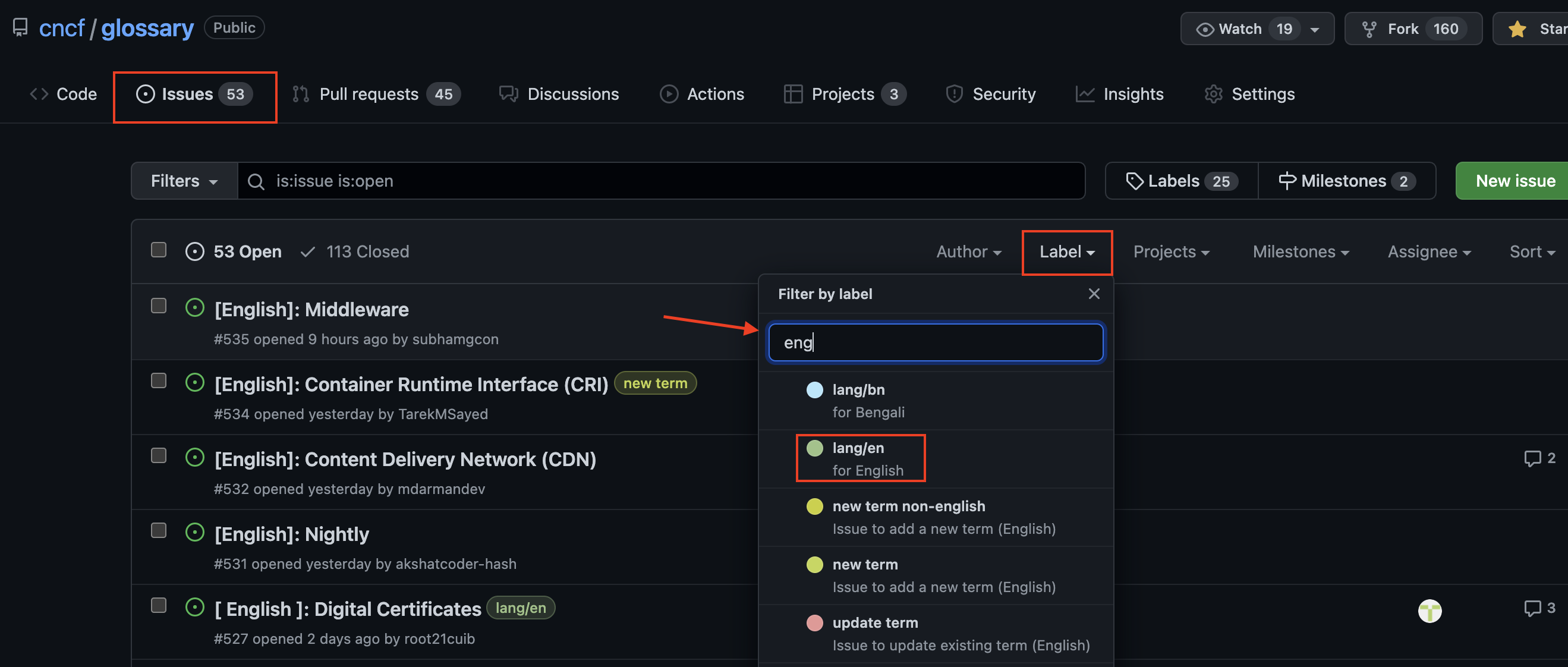
前往 [Glossary GitHub 存儲庫的議題](https://github.com/cncf/glossary/issues)找到可用議題列表。您可以使用標籤(例如,英語語言、需要幫助、良好的第一個議題)過濾議題。
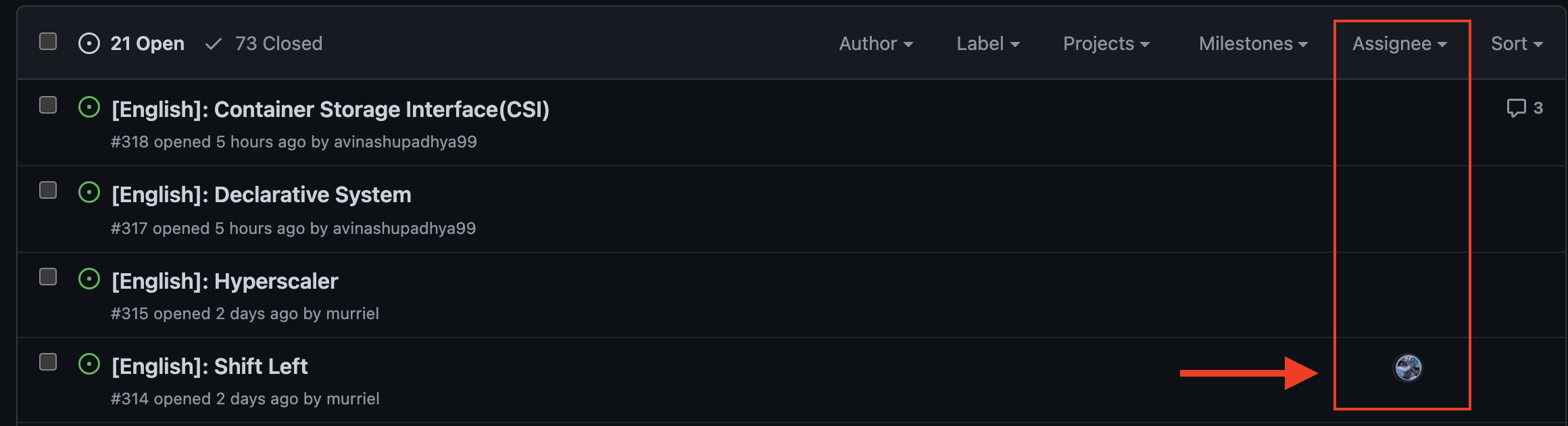
確保您選擇的術語還沒有被分配給任何人。例如,您可以看到前三個術語是可用的,而第四個術語已被分配。
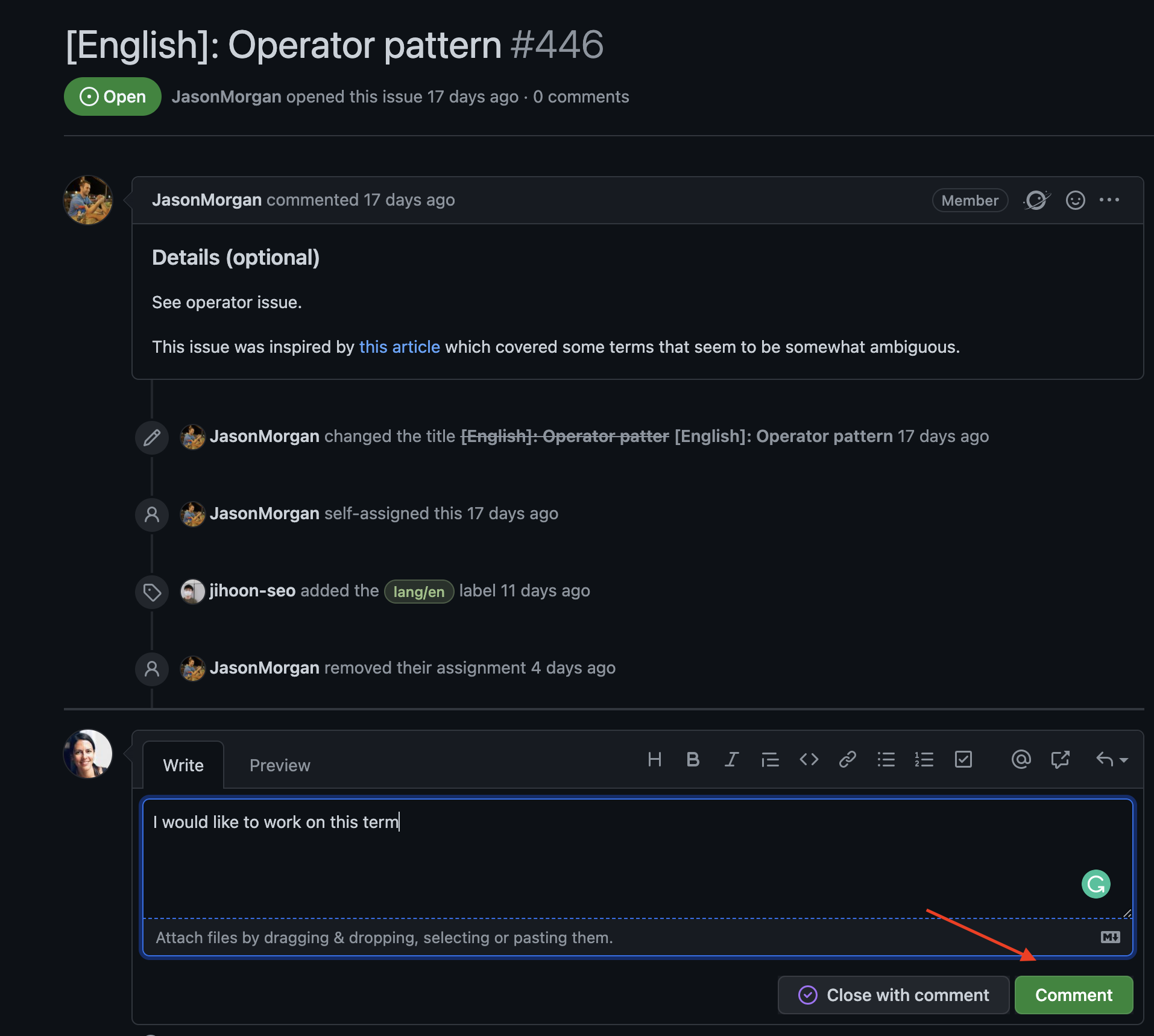
選擇一個要處理的術語後,在該議題上發表評論。
此外,請在 CNCF Slack 工作區的 [#glossary](https://cloud-native.slack.com/archives/C02TX20MQBB) 頻道中通知維護者
並標記 _@iamnoah_、_@nate-double-u_、_@Seokho Son_、_@Jihoon Seo_ 和/或 _@castrojo_,以確保他們不會錯過它。
有關下一步,請參閱[提交新術語(創建 PR)](#submitting-a-new-term)部分。
**注意**:您只能在維護人員將議題分配給您後開始處理議題。
您一次只能聲明一個術語。
處理多個術語是有連續性的,必須在聲明下一個術語之前完成當前術語。
## 提議新術語
您可以提出新術語供他人研究,或自己創建新定義。
不管哪種方式,您都需要從[新增議題](#creating-an-issue)開始。
每個新術語必須符合 [CNCF 的雲端原生定義](https://github.com/cncf/toc/blob/main/DEFINITION.md)才能被添加到 Glossary 中。
唯一的例外是理解雲端原生概念所需的基礎術語。
以下是對於不熟悉 GitHub 的人的逐步指南。
**如果您是 GitHub 專家**,請掃描本指南以獲取有關以下主題的足夠資訊:
1. 定位議題和新術語的樣板。
2. 聲明議題。
3. 解決[拼寫檢查](#spell-check)失敗的問題。
### 新增議題
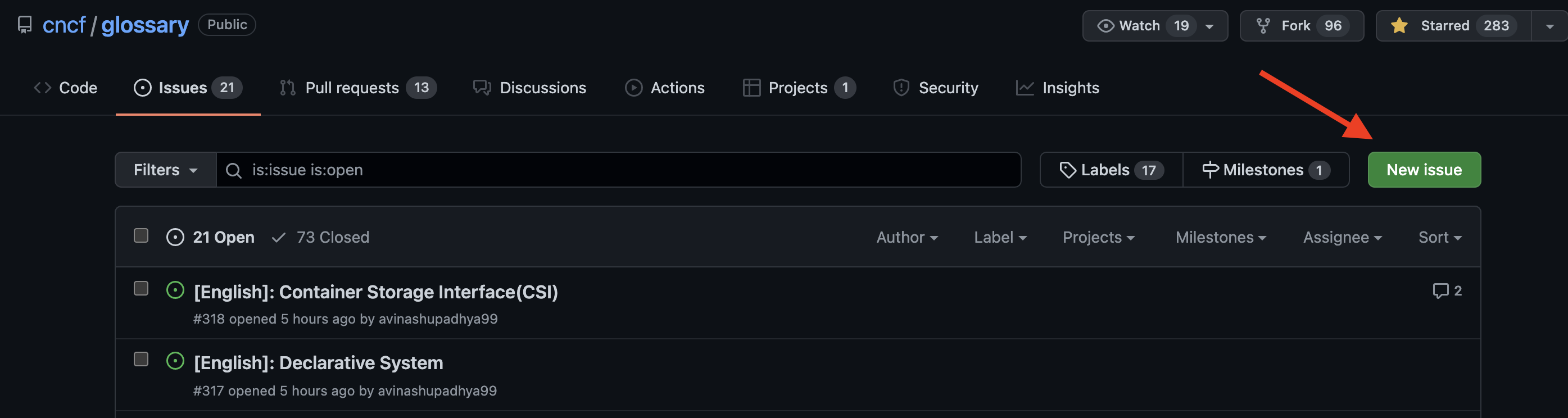
前往 [Glossary GitHub 存儲庫](https://github.com/cncf/glossary/issues)議題,然後點擊 "New issue"。
從樣板列表中選擇 "Request to add a new term (English)"。
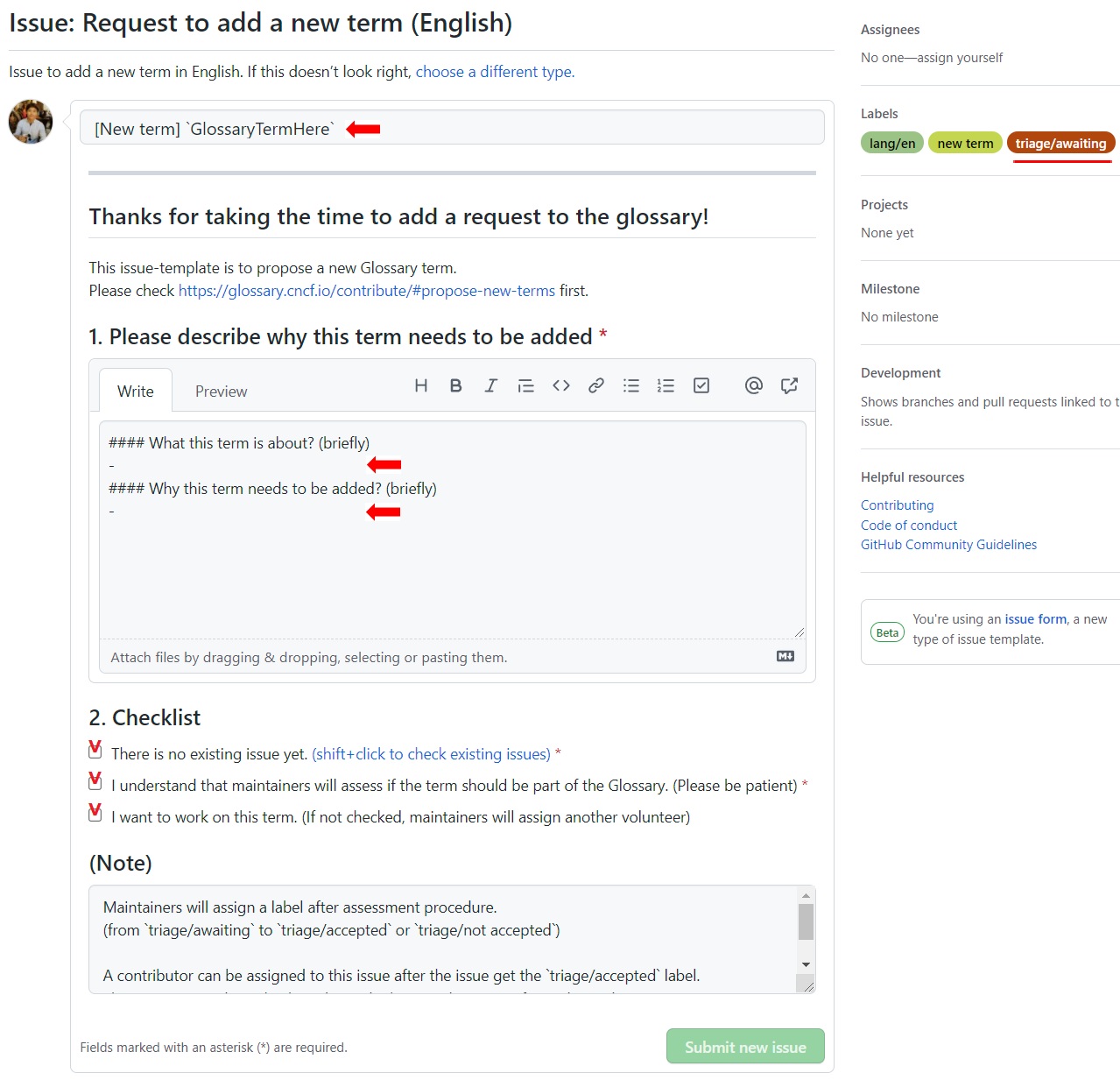
添加您建議的單字,回答議題,勾選方框,然後點擊 "Submit new issue"。
如果您只是提出新術語,那麼您已經完成了!如果您想要創建定義,請繼續閱讀。
### 緊急處理您的議題
接下來,維護者將會進行緊急處理。這意味著他們將評估該術語是否應該成為 Glossary 的一部分。
並不是每個術語都會被批准。若要納入 Glossary,它們應該是建立且廣泛使用的雲端原生概念。
請讓維護者知道您已在 Slack 上提出新術語並標記 _@iamnoah_、_@nate-double-u_、_@Seokho Son_、_@Jihoon Seo_ 和/或 _@castrojo_,以便他們不會錯過。
如果您想編寫定義,請讓維護者知道,他們會指派它給您。
### 提交新術語(創建 PR)
如我們的[風格指南](https://glossary.cncf.io/zh-tw/style-guide/)所述,我們強烈建議先使用 Google 文檔或 Word 文檔進行起草。
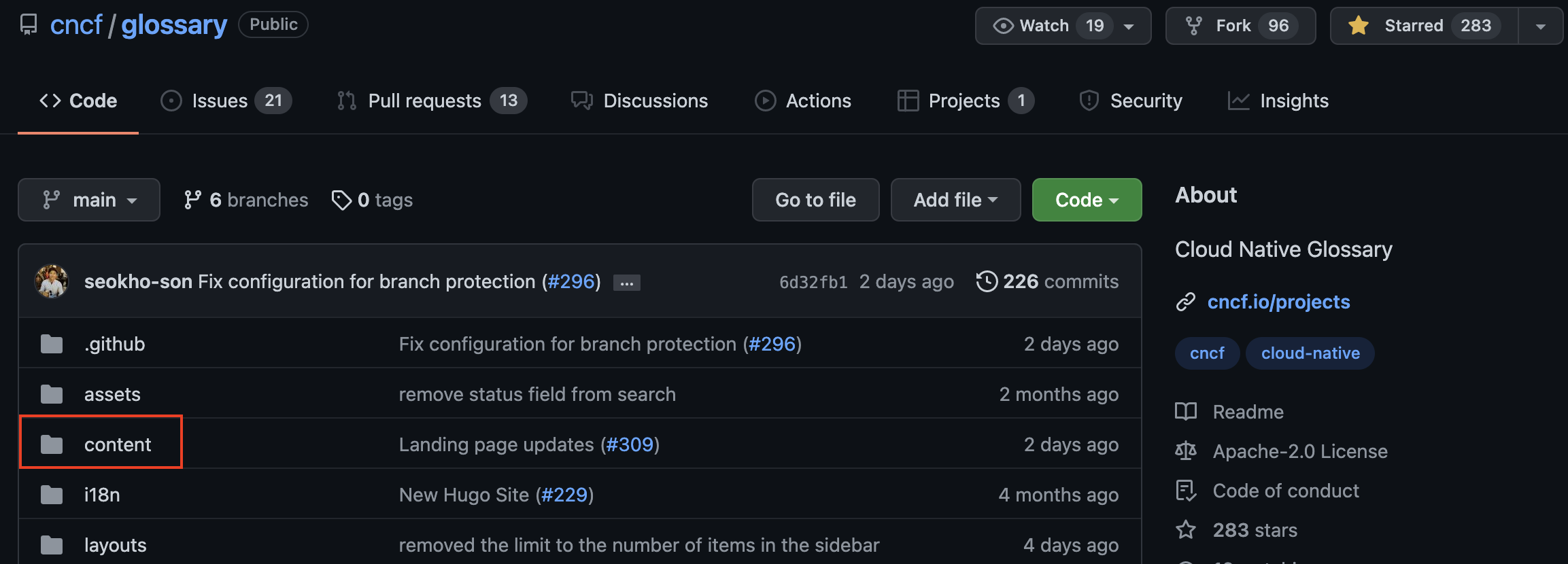
一旦術語準備好提交,請轉到 content(在 <> 程式碼下)...
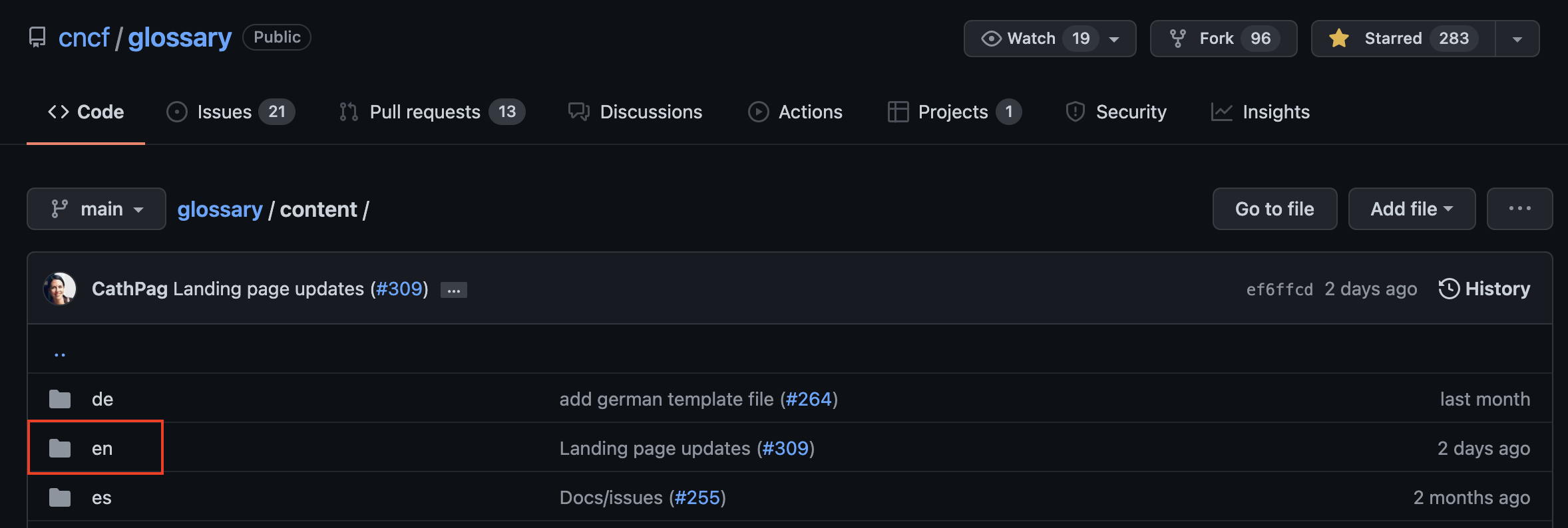
...然後轉到 "en" 或您要貢獻的語言的前兩個字母...
...並選擇 `_TEMPLATE.md`
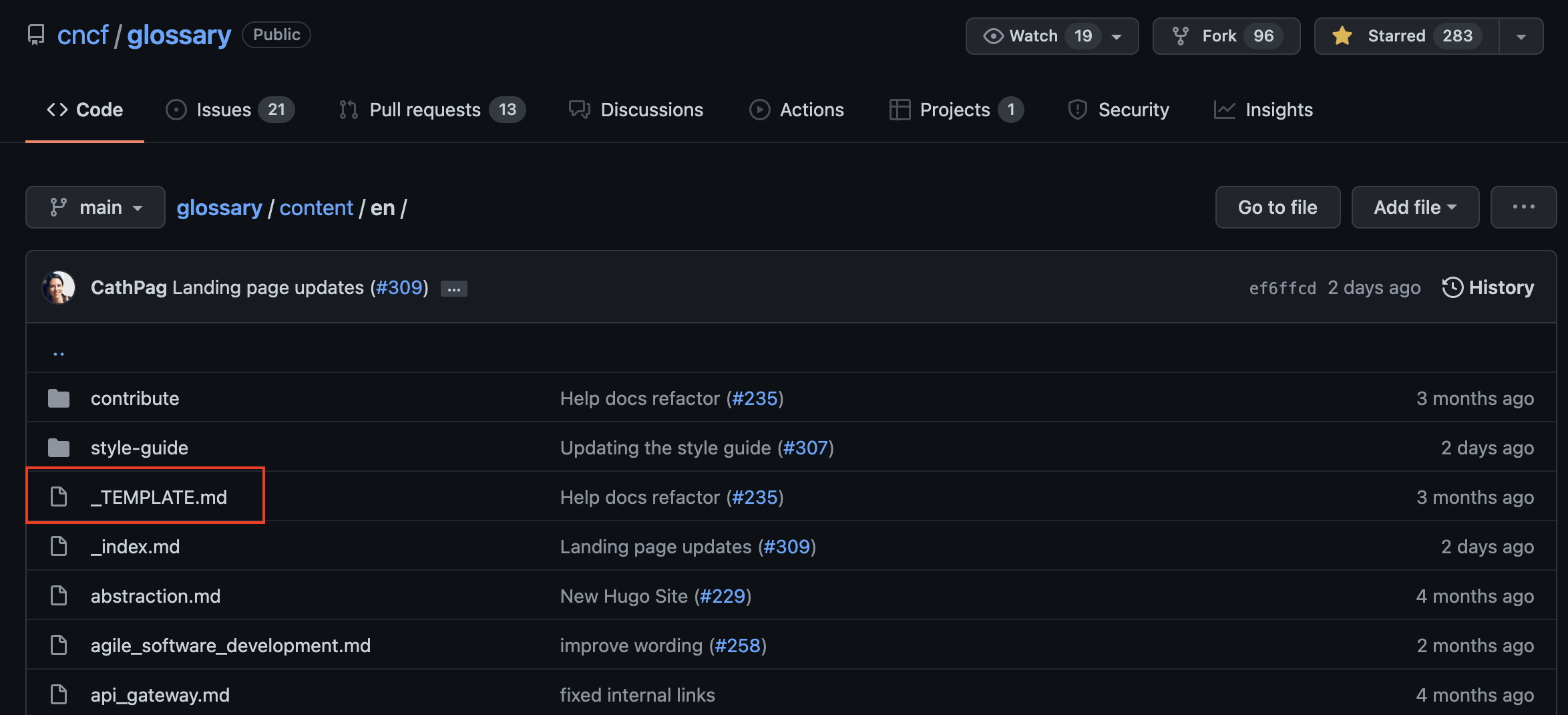
複製內容...
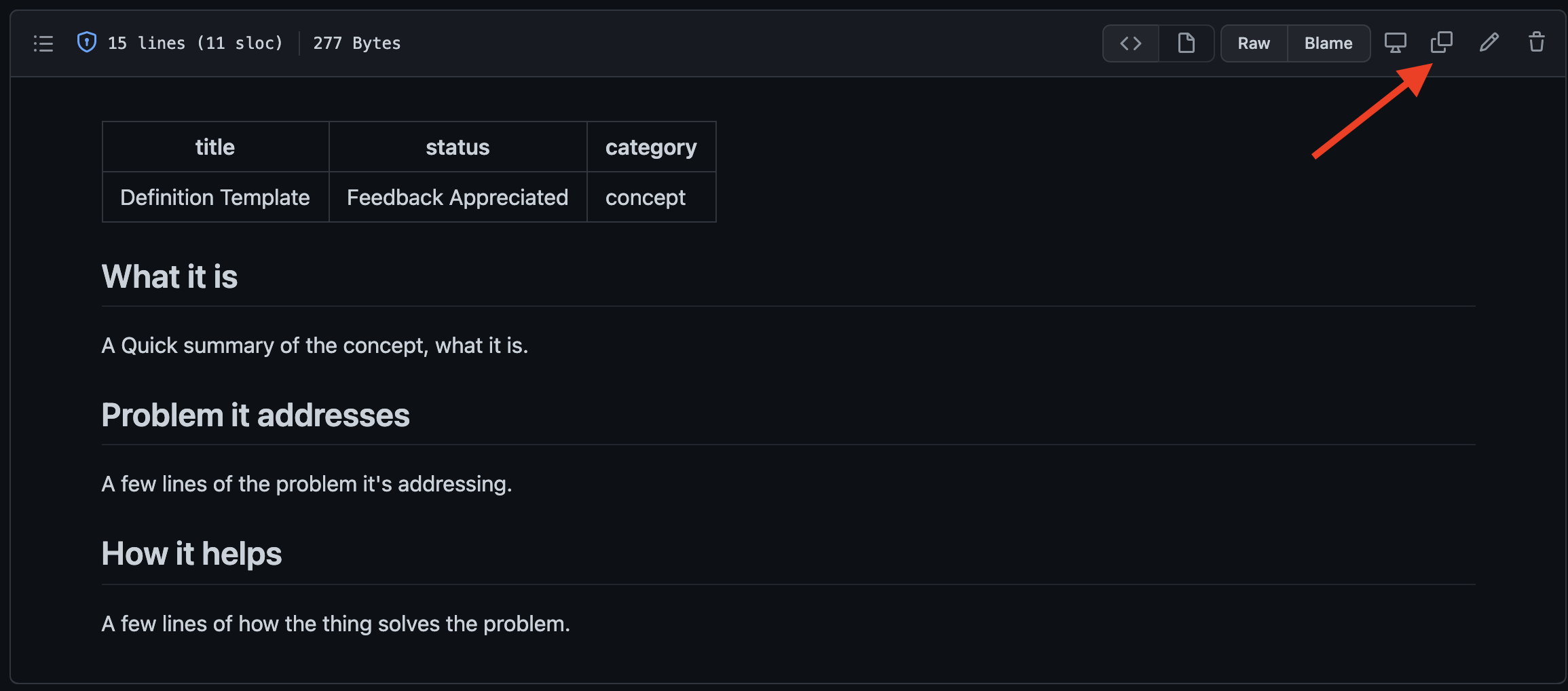
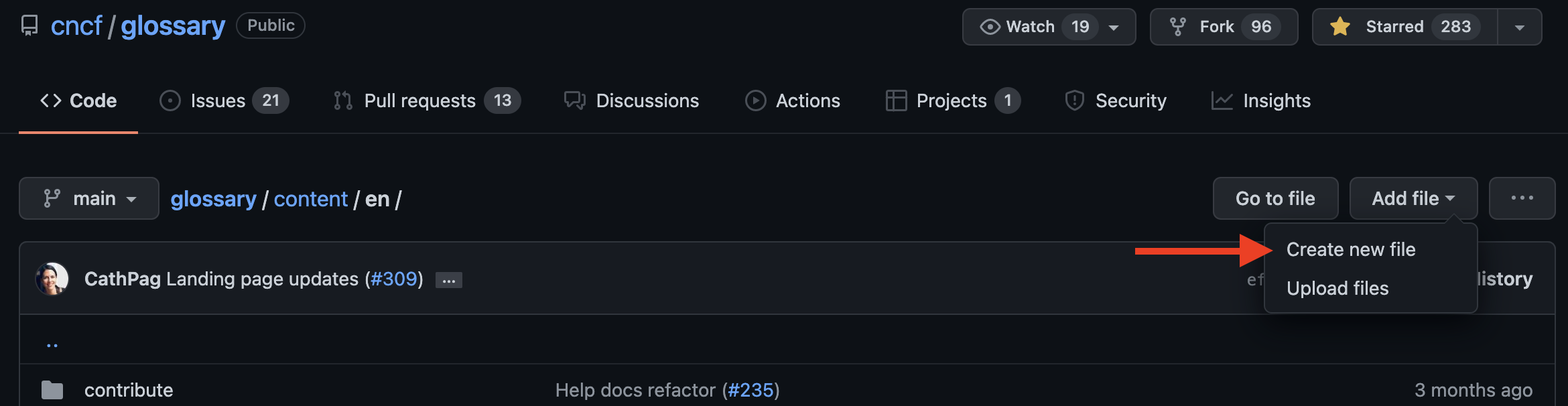
...然後返回 "en" 文件夾。單擊 "Add file" 並選擇 "Create new file"。
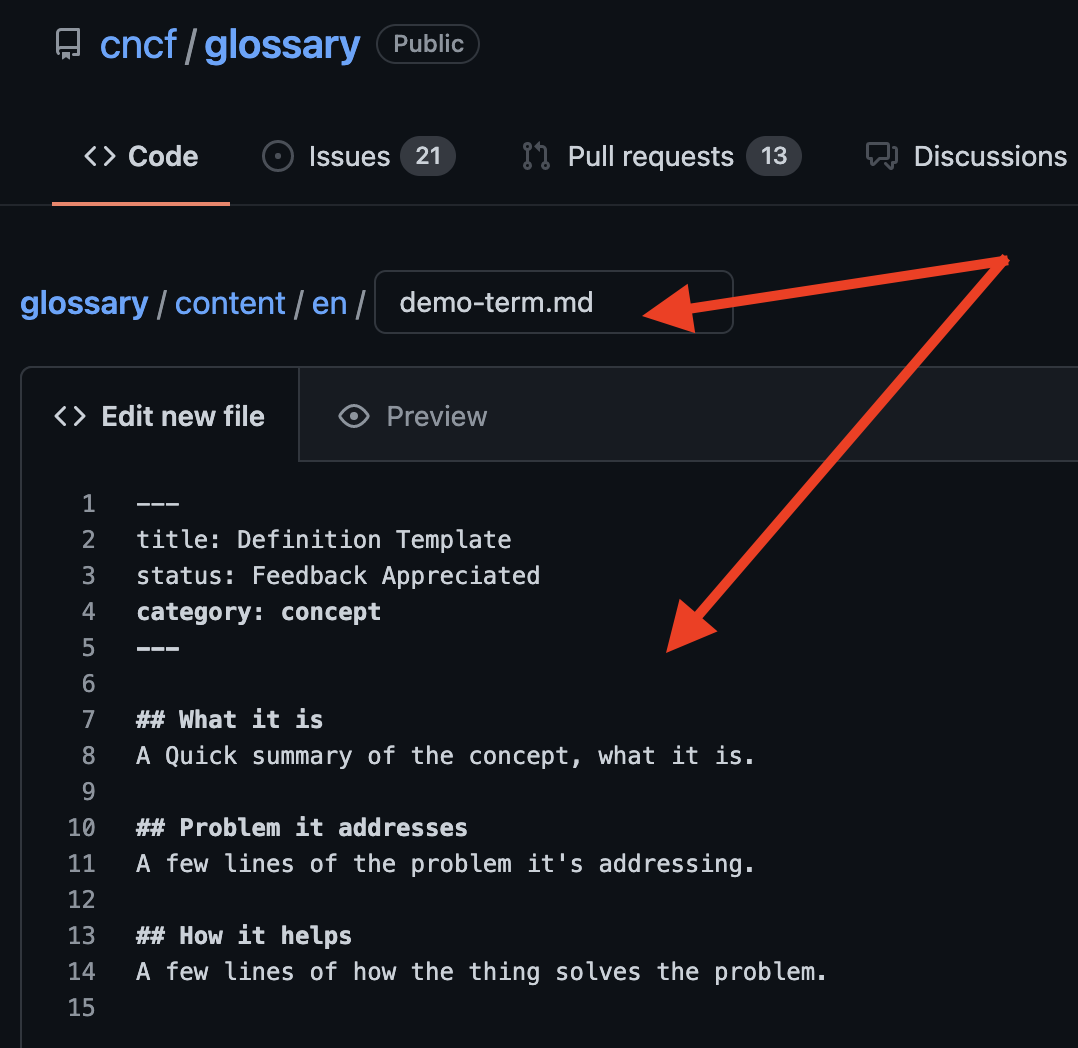
按照[最佳實踐](#best-practices)中所述,在 URL 中添加術語的名稱。在名稱的末尾添加 .md 副檔名(如果沒有此副檔名,您將無法預覽文件)。
現在在下面的部分中粘貼樣板內容。將定義文本的內容複製並粘貼到文件中。為了驗證您已按照[最佳實踐](#best-practices)中所述使用 Markdown,請單擊 "Preview"。
向下滾動並為新提交的文件命名。當您準備好提交時,請點擊 "Commit new file"

往下滾動並為新提交的檔案命名。當您準備好提交時,點擊 "Commit new file" 按鈕...
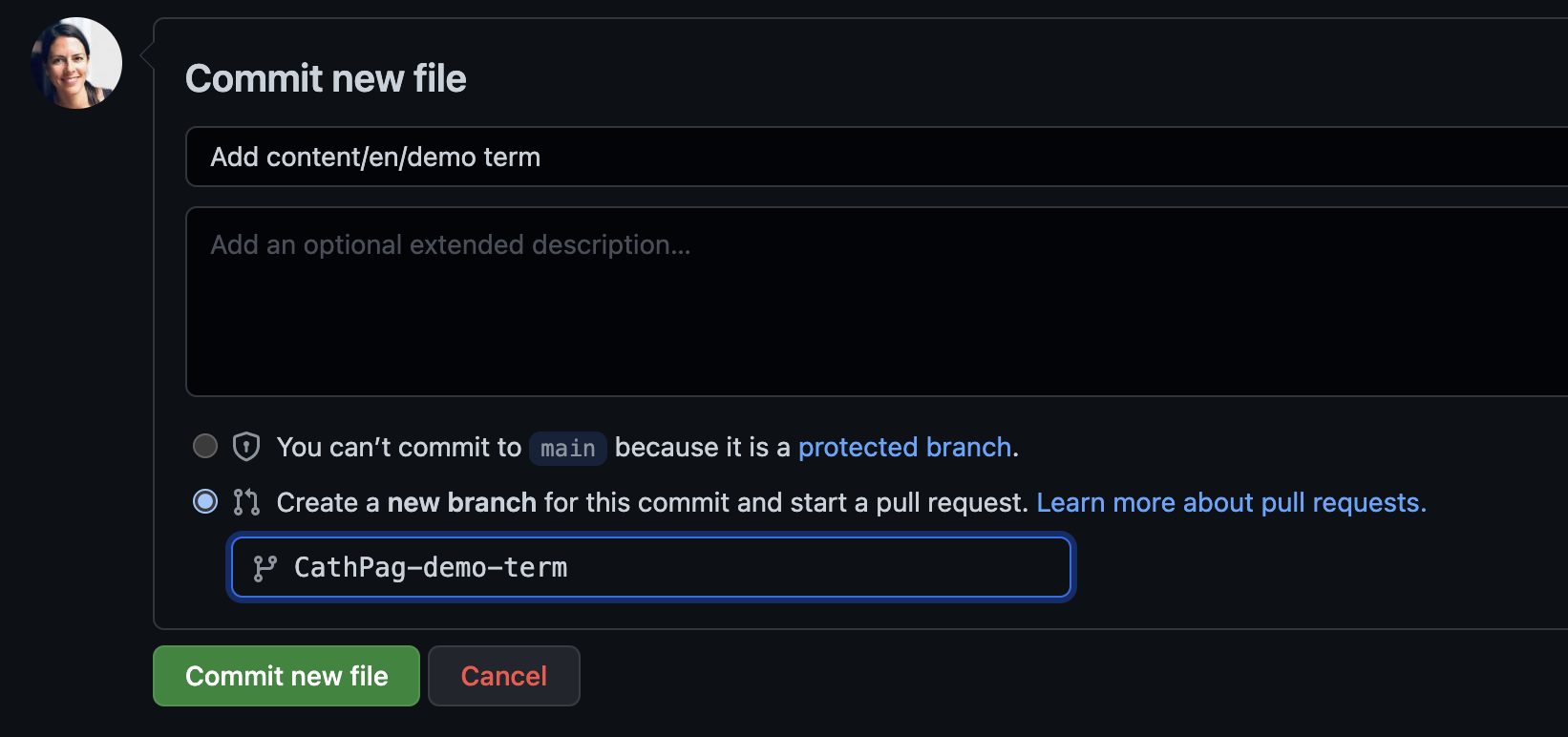
...現在您已準備好創建新的 PR:
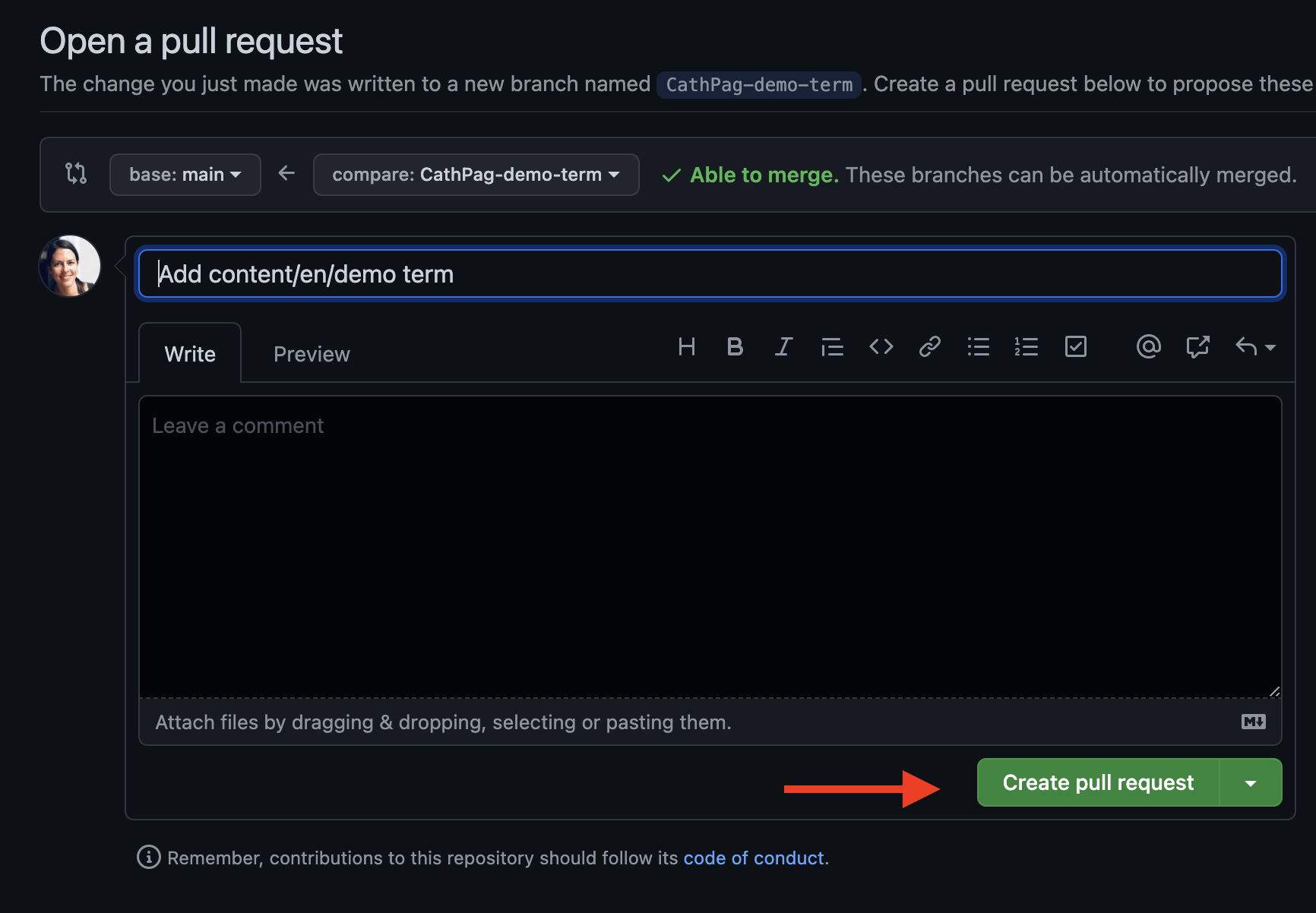
當您按下 "Create pull request" 按鈕時,您的 PR 應顯示在 "Pull requests" 標籤中。
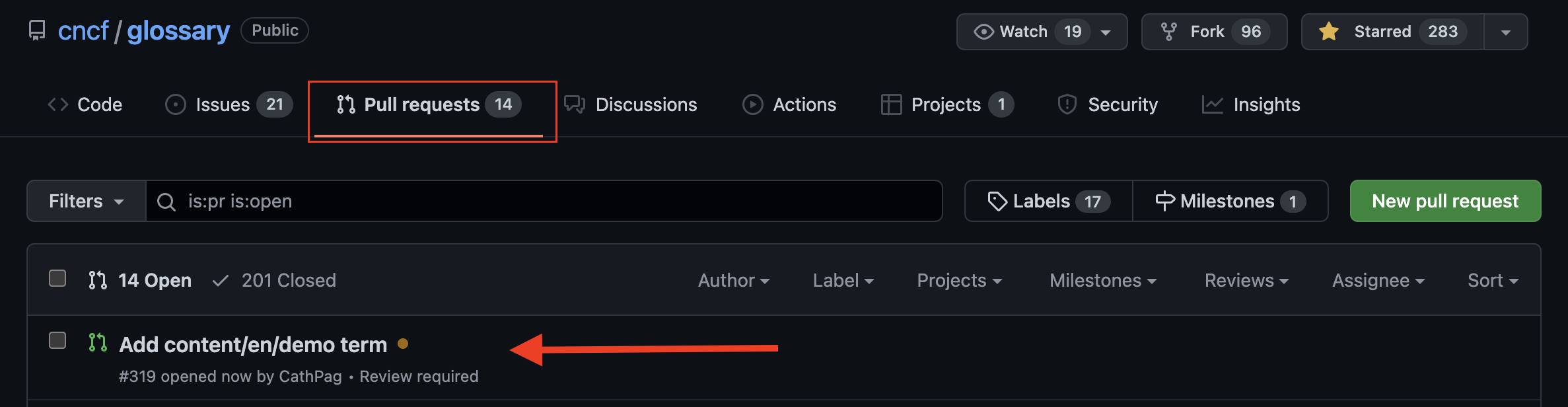
## 更新現有術語
要更新現有術語,您可以通過新增議題要求更改,
或可以自行進行更改並提交 PR。
### 透過議題要求更改
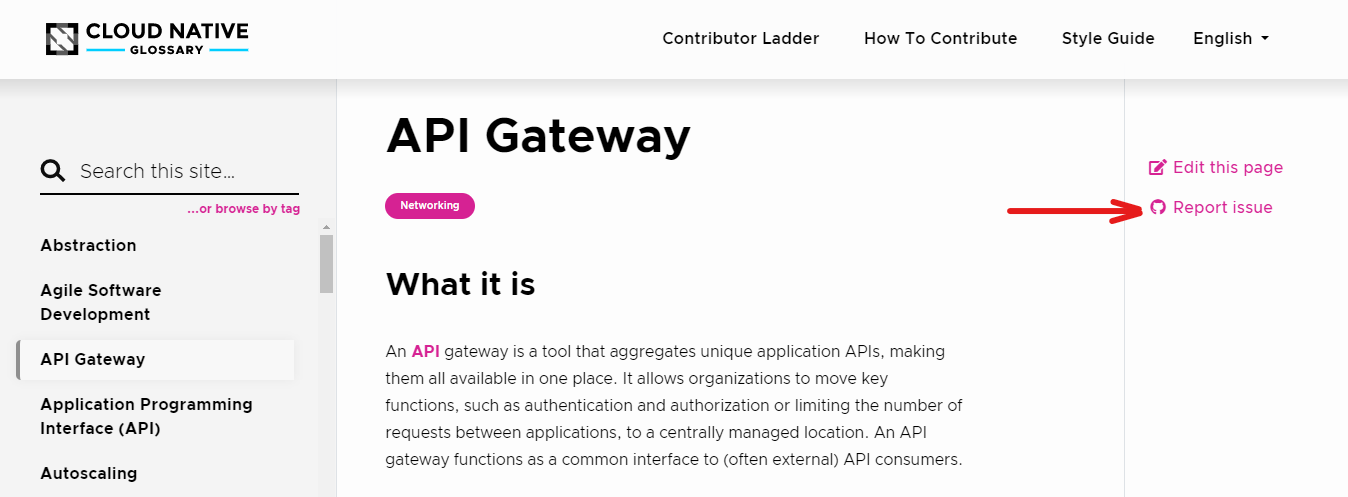
如果您想要標記術語的議題,您可以使用 CNCF Glossary 網頁的 "Report issue" 選項。
在您想要標記的概念的 CNCF 頁面上定位自己,然後點擊 "Report issue"。
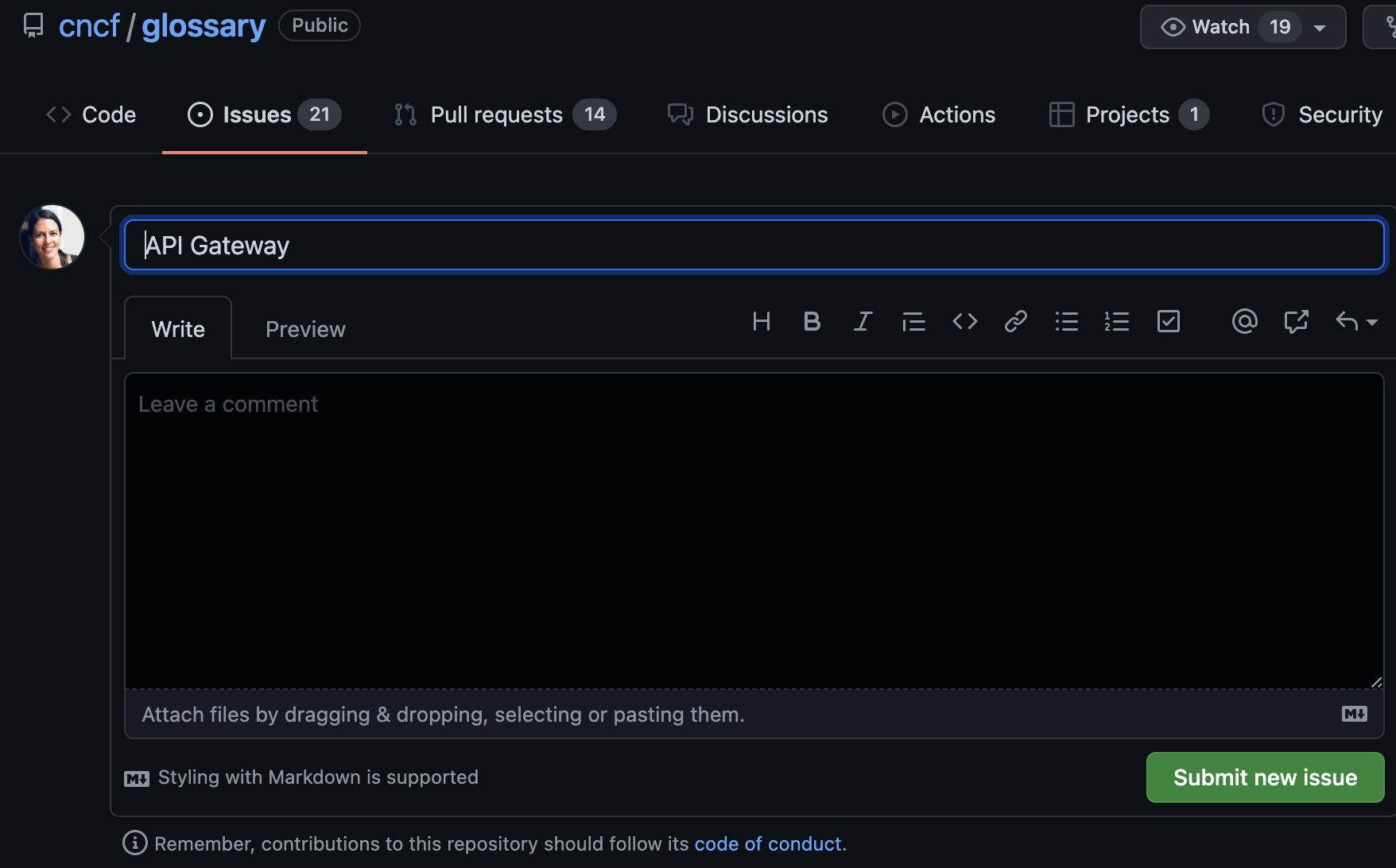
這會自動為您打開一個議題
請描述您的建議以及為什麼需要它們。點擊提交,就完成了。
### 直接更新術語
若要修改術語並提交建議,請點擊 "Edit this page."。
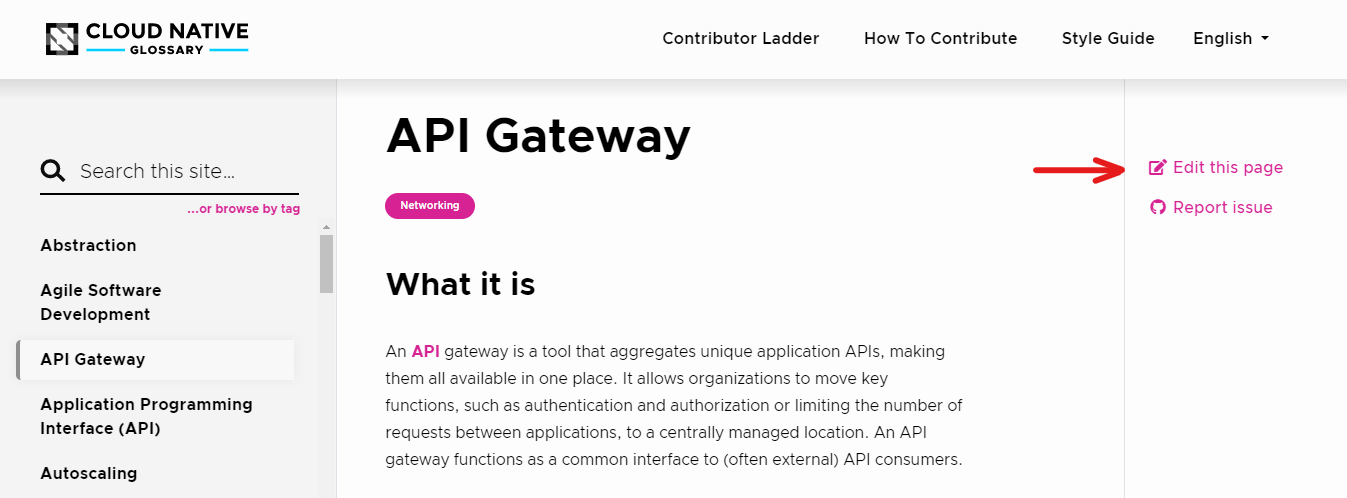
這將打開術語的 GitHub 頁面。進行修改並建立 PR。
請參考上面的[最佳實踐](#best-practices)部分,
並閱讀我們的[風格指南](https://glossary.cncf.io/zh-tw/style-guide/)以確保您遵循我們的指南。
## 幫助本地化 Glossary
如果要幫助將術語表本地化為目標語言,請加入 CNCF Slack 工作區中的 [#glossary-localizations](https://cloud-native.slack.com/archives/C02N2RGFXDF)頻道,然後發送消息給我們。
您可以加入現有團隊或創建新團隊
(要查看需要什麼,請閱讀我們的[本地化指南](https://github.com/cncf/glossary/blob/main/LOCALIZATION.md))。
請閱讀目標語言的**如何參與貢獻**指南,以了解該團隊的具體貢獻流程。
## 拼寫檢查
拼寫檢查可能失敗的兩個主要原因:
- PR 中包含拼寫錯誤。
- PR 中包含未在單字列表中註冊的單字。
要將新單字添加到列表中,請按照以下步驟進行操作:
1. 在您的 PR 中,找到 "wordlist.txt" 文件。
2. 點擊 "Edit this file" 並按字母順序添加缺少的單字。
3. 添加提交消息,然後選擇 "Sign off and propose changes"。
**注意**:拼寫檢查不區分大小寫。
**我們基於 [The Good Docs Project](https://thegooddocsproject.dev/)的樣板更新了此指南。**
---
- Canonical URL: https://glossary.cncf.io/zh-tw/contribute/
- Status: Completed
- 最後編輯 September 17, 2023: ` [tw] Update contribute/_index.md for Traditional Chinese (#2359) ` ([6b4adc9](https://github.com/cncf/glossary/commit/6b4adc9bb9ac3ff479dcc55e7f6a837203cd6e22))
- Source: https://github.com/cncf/glossary/blob/main/content/zh-tw/contribute/_index.md
- License: [CC BY 4.0](https://creativecommons.org/licenses/by/4.0/)